.png)
How to Check Who Has Opened or Signed a Document?
You can track the live status of any document directly from your active dashboard workspace if you are a registered user. If you are an external recipient without an account, you can still view the document's real-time audit logs by opening your original email invitation link.
1. For Registered Verified Users (Senders)
If you are the person who created and sent the envelope, you have complete visibility over the transaction's progress:
Log into your account and navigate to your Dashboard or Archive.
Locate the specific envelope you want to track.
Click on the envelope to expand its summary view.
Here, you will see a real-time tracking list showing the exact status for every recipient (e.g., Sent, Opened, Signed, or Rejected).
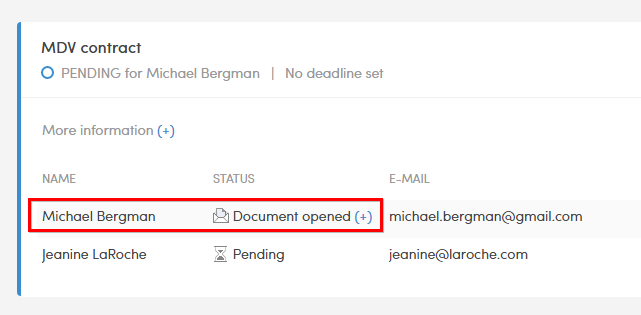
2. For External Recipients (Non-Registered Users)
If you are one of several recipients invited to sign a document and do not have a Verified account, you can still view the progress of the signing circle:
Open your original signature invitation email and click the secure link to open.
In the document menu layer, locate and expand the Transaction Log or Activity Log.
This panel will display an ongoing list showing which other invitees have already opened or interacting with the file.
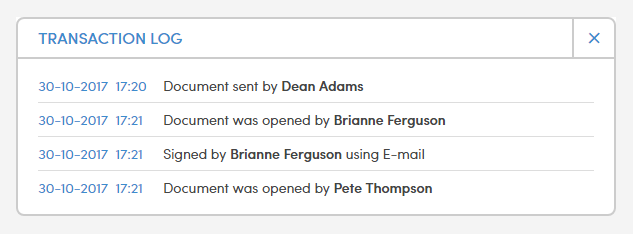
⚠️ Workflow Notice: Sequential vs. Parallel Signing
The visibility of other recipients' activity within the log depends entirely on the signing workflow configuration chosen by the sender:
Sequential Signing (One-by-One): If the document is set to go from person to person in a strict order, you will only see the status of people placed before you in line. You will not receive your invitation link until all previous parties have fully signed, and you cannot see the status of anyone placed after you.
Parallel Signing (All at Once): If the document was sent to everyone simultaneously, the transaction log is fully visible. You will be able to see exactly who has opened or signed the document at any time, regardless of the order.
More information about the signing order can be found here.