.png)
What to Do If a Recipient Is Taking Too Long to Sign
If a recipient is delaying the signing process, you don't need to cancel and restart the transaction. You can remind them by sending a manual notification or extending their signing deadline directly from your account.
Option 1: Send a Direct Reminder (The Bell Icon)
You can gently prompt a signer to look at their inbox by triggering a manual reminder notification. Here is how:
Log into your Verified account and go to your Dashboard.
Locate and click on the specific envelope that is awaiting signatures to expand its details.
Look for the Bell Icon 🔔 next to the unresponsive recipient's name.
(Optional) Customize the reminder message if you want to add a personal note or emphasize urgency.
Click Send. The platform will immediately dispatch a fresh signing link to their inbox.
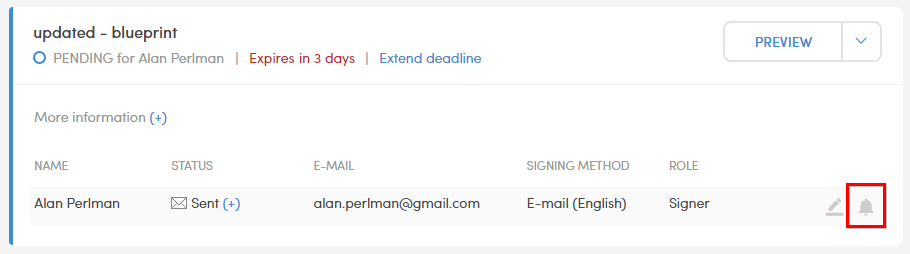
Option 2: Extend the Signing Deadline
If you initially set an expiration date on the envelope and that date is approaching (or has already passed), the original link will lock them out.
The Fix: You can expand the envelope settings from your Dashboard or Archive and extend the deadline. Extending the date automatically reactivates the original signing link so the recipient can complete the process without you having to recreate the entire envelope.