.png)
What Is the Signing Order of an Envelope?
When sending a document (an envelope) to multiple people, you have full control over the path the document takes. Verified offers two primary signing workflows: Sequential (one-by-one) and Parallel (all at once).
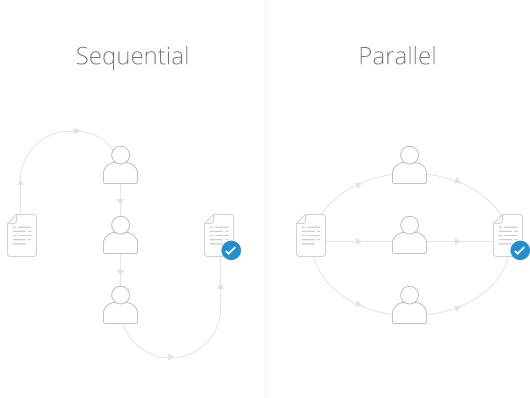
No matter which order you choose, once the very last recipient signs, the platform automatically emails a finalized, legally binding copy of the completed files to everyone involved (the creator and all signers).
The Two Signing Workflows
1. Sequential Signing (One-by-One)
In a sequential workflow, recipients sign the document package in a strict, predefined order.
How it works: The first recipient on your list receives the initial email invitation. Only after they review and successfully sign the document will the platform automatically generate and forward the invitation link to the next recipient in line.
Best for: Linear approvals where structural hierarchy matters (e.g., an employee or tenant must sign an agreement before a manager or landlord executes it).
2. Parallel Signing (All at Once)
In a parallel workflow, the document is distributed to all stakeholders simultaneously.
How it works: Every recipient receives their unique signing invitation link at the exact same time. They can open, review, and apply their electronic signatures at their own convenience, completely independent of the other parties.
Best for: Co-signers, standard multi-party contracts, or board resolutions where the individual order of operations does not matter and speed is your top priority.
🛠️ Managing Your Signing Order
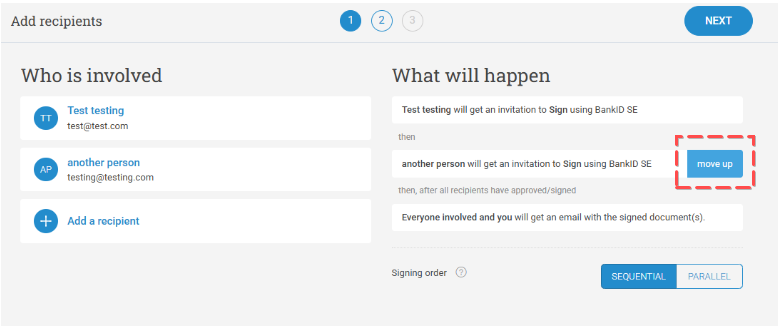
How to Adjust the Sequence During Setup
You can easily toggle and arrange the flow while building your draft:
The Action: In Step 2 (Recipients) of the envelope creation wizard, ensure your workflow toggle is set to sequential. To adjust the sequence, hover your mouse over the drag handle or the list index area next to the recipient's name, then click and slide them up or down into your preferred signing position.
⚠️ Critical Rule for Sent Envelopes
You cannot alter the signing order for an already sent envelope.
Once an envelope transitions from a draft to a live transaction, its cryptographic routing path is locked to preserve legal audit integrity. If you need to fix a broken sequence on a live document, you must abort the transaction and launch a fresh envelope with the correct order.