.png)
Troubleshooting: Not Receiving Your Verification SMS
When signing documents or authenticating your identity via Verified, an SMS code is sent directly to your mobile device. If you haven't received your code, follow these troubleshooting steps to resolve the issue.
1. Verify Your Phone Number with the Sender
The most common reason for a missing SMS is an incorrect or improperly formatted phone number.
Check the invitation email: Look at the original signature request email you received. The sender's contact information will be listed there.
Contact the sender: Reach out to the sender directly to confirm they entered your exact phone number, including the correct country code (e.g., +46 for Sweden, +47 for Norway).
2. Refresh and Resend the SMS Code
Cellular network delays can occasionally stall incoming text messages.
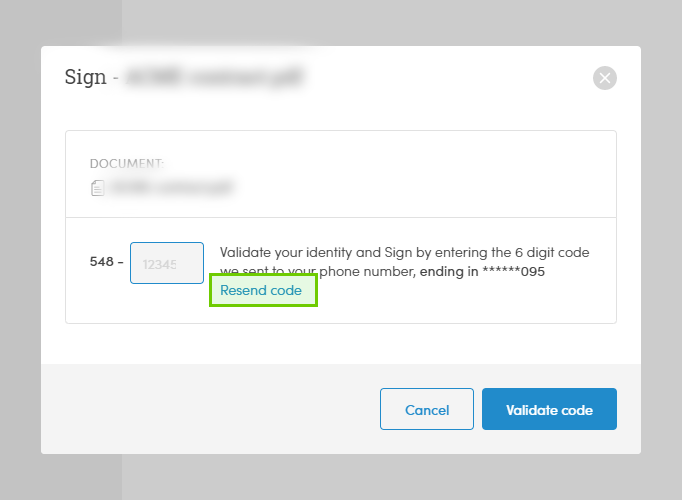
Click "Resend SMS": If the code hasn’t arrived after a few minutes, use the Resend SMS option displayed on your signing screen.
Check your network coverage: If your signal strength is weak, the SMS may be delayed by your carrier.
Reopen the link: If you are in a low-coverage zone, wait until you have a stable cellular connection, reopen the original invitation link from your email, and try requesting the code again.
3. Restart and Check Carrier Status
If your phone number is correct and you have a strong signal but still receive nothing, a device or carrier block might be occurring.
Restart your phone: Turning your mobile device off and back on forces it to reconnect to the nearest cellular tower, which often flushes out stuck text messages.
Check for carrier disturbances: Verify if your mobile service provider is currently experiencing network outages or delays with automated application-to-person (A2P) messaging.
Still Need Help?
If you have confirmed your number is correct, restarted your device, and verified your carrier is running normally, our engineering team can investigate the SMS delivery logs for you.
Please contact us at support@verified.eu and include the following details so we can assist you quickly:
The mobile phone number experiencing the issue (including country code).
The name of your mobile network carrier (e.g., Telia, Telenor, Tele2).