.png)
Understanding the PAdES PDF Format
PAdES (PDF Advanced Electronic Signatures) is an international standard that turns a regular PDF into a self-contained, legally binding, and tamper-evident digital contract.
Defined by the European Telecommunications Standards Institute (ETSI), PAdES complies with EU eIDAS regulations, ensuring that documents executed on the Verified platform are recognized across international borders and remain legally valid for decades.
👥 Who Is Impacted?
Every user on the Verified platform. All final documents generated upon completion of a signing process are automatically packaged and sealed in the PAdES format.
🛡️ Key Benefits: Long-Term Archiving (LTA)
Under traditional electronic signing methods, a document's legal validity can degrade over time if the digital certificates expire or if cryptographic hashing algorithms are retired.
PAdES solves this through Long-Term Validation (LTV) and Long-Term Archiving (LTA):
Permanent Legal Standing: PAdES embeds cryptographic time stamps and certificate validation proofs directly into the document at the exact moment of signing.
Algorithm Resilience: Even if a specific encryption algorithm or third-party certificate authority changes years down the road, you can still independently prove that the signature was valid when the document was signed.
All Verified Methods Are LT-Enabled: Every signing method supported by Verified—from national eIDs to SMS and Touch Sign—generates an LT-compliant record by default.
📦 What’s Inside a PAdES File? (The File Structure)
Rather than just placing a visual image of a signature on a page, a PAdES document acts as a secure container that bundles the complete transaction history within the PDF itself.
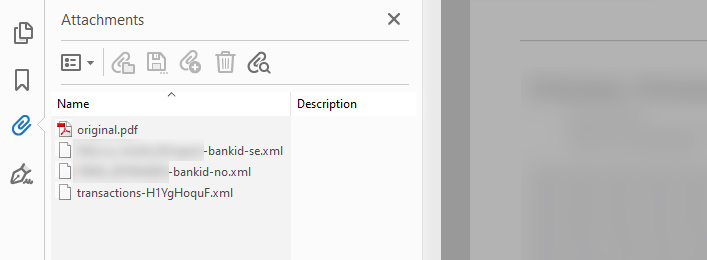
When you open a signed document in an advanced viewer like Adobe Acrobat Reader and view the attachments panel, you will find:
The Original Document: An intact copy of the pristine, unsigned PDF uploaded at the beginning of the transaction. This allows independent auditors to compare the raw source file directly against the final version.
Individual Signature Evidence Files: One cryptographic evidence file per signer, containing technical proof of verification:
For eID Methods (e.g., BankID, MitID): The cryptographic token and certificate data issued directly by the national identity provider.
For eSign Methods (Email, SMS, Touch Sign): The security certificates, authentication metadata, and verification proofs issued by the Verified platform.
Transaction Audit Log: A complete chronological log documenting every platform event, including creation, delivery notices, document open events, IP addresses, and completion timestamps.
⚙️ Practical Changes to Expect
When working with PAdES documents, keep these operational details in mind:
The
.padesFile Extension: To clearly distinguish signed agreements from unexecuted drafts, Verified automatically appends.padesto the filename.Example: An uploaded file named
employment-contract.pdfwill download asemployment-contract.pades.pdf.
Larger File Sizes: Because the PAdES file securely embeds the original document, cryptographic evidence records, and the full audit trail inside a single PDF wrapper, the final download will naturally have a larger file size than the original upload.
❓ Frequently Asked Questions (FAQ)
How can I verify that a document conforms to the PAdES standard?
You can independently validate the signature chain, timestamp, and document integrity using multiple tools:
Adobe Acrobat Reader: Open the file, open the left Signatures panel, and inspect the signature properties.
The European Commission DSS Validator: Upload the document to the official EU Digital Signature Service portal for a comprehensive eIDAS compliance audit.
The ETSI Conformance Checker: For advanced technical conformance audits.
(For detailed instructions, see our guide on How to Validate a PAdES Signed Document).
Can I upload an already signed PAdES PDF into a new Verified envelope?
No. An already signed PAdES document is cryptographically locked to prevent unauthorized modifications. Uploading it into a new transaction to add additional signatures alters the binary file structure, which breaks the original cryptographic seal and invalidates earlier signatures. New envelopes should always be initiated using clean, unsigned source PDFs.