.png)
Updating a project risk assessment
To ensure that changes to the risk matrix take effect on existing projects, a manual update must be performed for each individual project. Until an update is made, the previous risk model, including its specific questions and scoring, will continue to be used.
How to update a project
To activate the new risk assessment, navigate to the project and follow these steps:
Open the project.
On the Overview or Risk assessment tab , click "Update" in the Risk assessment box displaying the message "Outdated risk matrix!".
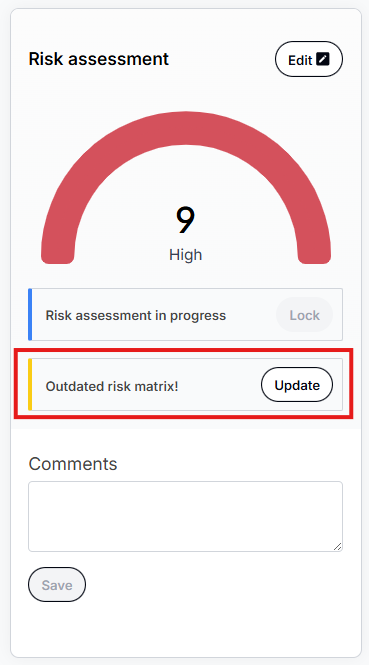
Please note: Until you click "Update," the project will retain its previously calculated risk. No automatic changes occur in the background.
When does this apply?
The update needs to be performed regardless of the current status of your project. This includes:
New projects: Where the KYC has not yet been sent out.
Ongoing KYC: Where the form has been sent but not yet answered.
Answered KYC: Where the form has been received but the risk assessment is not yet finalized
It is not possible to update an outdated risk matrix on locked or sealed projects. A locked assessment needs to be unlocked first, it is possible to mark the update outdated risk when confirming unlocking. For sealed projects, the risk matrix will be automatically updated to the latest version when a new assessment is started.
Locked Risk: Projects where the KYC is answered and the risk is already locked.
Sealed projects: Projects where a final report has already been generated.
How is the risk value affected?
When you update the risk, a recalculation is performed based on the changes made. This may result in changes to the project's total risk level (e.g., from Low to Medium):
Risk Model: If the risk model is switched (e.g., between Weighted and Point-based), scores will be recalculated according to the new model, which may result in a different risk level for the projects.
Changed Scale: If the risk scale is modified (for example, from 1–9 to 1–4), the total risk value will be adjusted to fit the new scale.
What happens to old reports?
Updating the risk is forward-looking. This means that sealed final reports are not affected. Historical documents remain unchanged to ensure an accurate audit trail of past assessments.