.png)
I need to correct an error in a filled or signed Self Declaration Form
If you need to correct or update an error in a filled and signed Self Declaration Form you can do so by reading this article.
This article contains guides for both AML Portal versions.
AML Portal
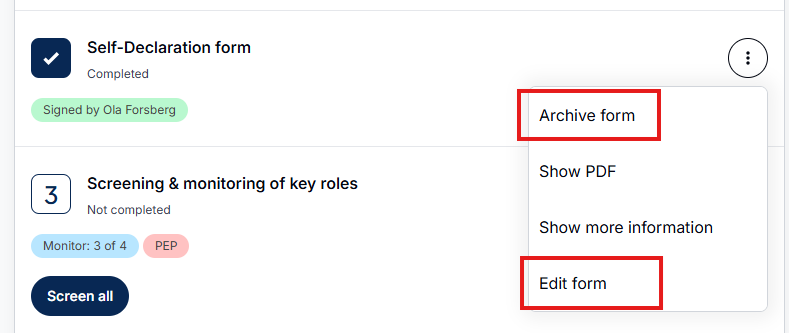
In the AML Portal you can either Archive form or you can the Edit form.
Archiving the form will archive the form and a new form will be available to send. The recipient of the KYC form will need to fill out all the details again as well as signing the document.
By clicking Edit Form all previous data provided will be kept and the recipient can update after receiving the form. The recipient will need to sign the form again after completion.
AML 1.5
In AML 1.5 you can either wipe the data from the form by clicking the trash -icon or keeping old content by clicking the arrow -icon.

Resend the form with filled data
By clicking the arrow -icons you can keep the old data in the form and send it again for the recipient for editing and signing.
Delete the form
By clicking the trash -icon you will delete the form, except the data that was fetched using company search.
Note that the recipient needs to fill all the details for the form again and also sign the document.